Redis CLI and Data Structures: From Basics to Mastery
A compact guide for running Redis locally, understanding its core data structures, and practicing with CLI commands.
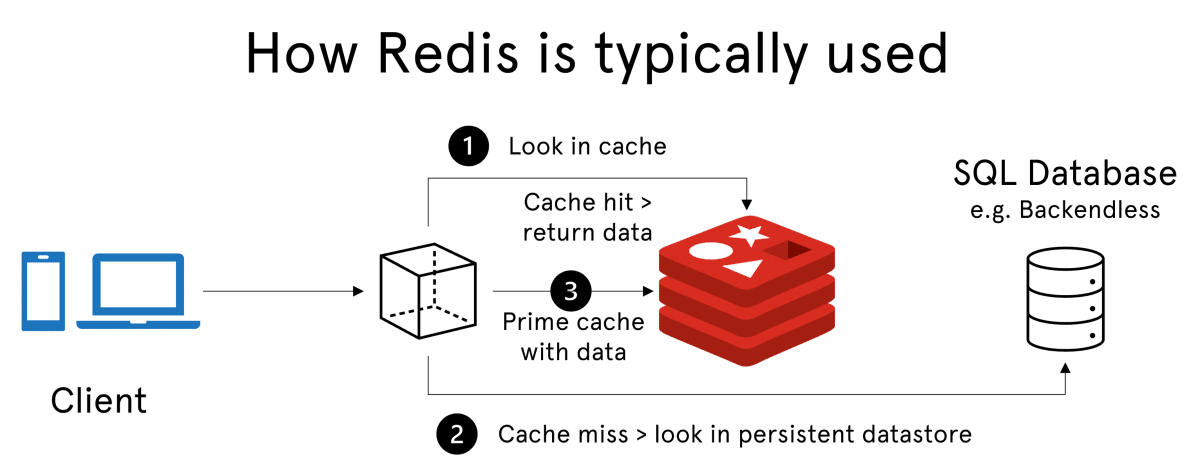
What is Redis?
Redis is an in-memory data store used as a fast database and cache to quickly store and retrieve data.
How Redis Works
- Client (your app) sends request. Example: "Give me user data".
- Check Redis (cache) first. If data is already in Redis, return it instantly.
- If not in Redis, fetch data from database (DB).
- Store that data in Redis (cache).
- Send data back to client.
- Next time same request, data is already in Redis and is fast.
In one line: Client -> Redis (cache) -> if not found -> DB -> save in Redis -> return to client.
Why Use Redis?
- Very fast (in-memory).
- Reduces load on database.
- Perfect for caching, sessions, and real-time apps.
How to Start the Project
You can run the entire application (Node.js server + Redis Stack) using Docker Compose:
# Start the application
docker-compose up --build- App Server: http://localhost:3000
- RedisInsight GUI: http://localhost:8001
Docker Redis Setup
# Run Redis Stack container with RedisInsight UI
docker run -d --name redis-stack -p 6379:6379 -p 8001:8001 redis/redis-stack:latest

# Access the container terminal (optional)
docker exec -d -it redis-stack bash

# Launch Redis CLI inside container
redis-cli
Redis Server port: 6379
RedisInsight GUI: http://localhost:8001
Redis Data Types Documentation
To learn more about Redis data types and their implementations, see the Official Redis Documentation.
Simple key-value pairs.
When to use: Store simple values by key.
Use case: OTP codes, user session token, feature flags.
SET key value- Set the value of a keyGET key- Get the value of a keyDEL key- Delete a keyAPPEND key value- Append a value to a key
Collections of string elements sorted by insertion order.
When to use: Maintain ordered items with push and pop operations.
Use case: Recent activity feed, task queue, chat message buffer.
LPUSH key value- Prepend an elementRPUSH key value- Append an elementLPOP key- Remove the first element-
LRANGE key start stop- Get a range of elements
Unordered collections of unique strings.
When to use: Track unique values without duplicates.
Use case: Unique website visitors, user tags, permissions per user.
SADD key member- Add members to a setSMEMBERS key- Get all members in a set-
SISMEMBER key member- Check membership SREM key member- Remove members
Unique strings ordered by an associated score.
When to use: Rank items and query by score.
Use case: Leaderboards, priority queues, trending content ranking.
-
ZADD key score member- Add or update members -
ZRANGE key start stop- Return a range of members ZREM key member- Remove membersZRANK key member- Find member index
Append-only data structure suitable for message brokering.
When to use: Keep ordered event logs and let consumers read events.
Use case: Event pipeline, order processing, background worker communication.
-
XADD key ID field string- Append to a stream -
XRANGE key start end- Return a range of elements -
XREAD COUNT count STREAMS key ID- Read streams XLEN key- Return entry count
Coordinates and distance calculations.
When to use: Store locations and run proximity searches.
Use case: Nearby stores, delivery radius, ride-hailing nearest driver search.
-
GEOADD key longitude latitude member- Add items -
GEOPOS key member- Get member coordinates -
GEODIST key member1 member2- Distance between members -
GEOSEARCH key FROMMEMBER member BYRADIUS radius- Query within radius